

The Common Problems with Modern Meetings
Delays, dropped audio, and frozen video streams are issues most organisations struggle with during meetings. Some issues are related to the integration of different communication tools: inter-app communication issues, meeting platform jigsaw puzzles, and calendar conjunctions, while restrictive security settings can keep some attendees hostage.
These integration issues become more pronounced in a hybrid work setup. Systems are expected to work in a coherent and user-friendly manner to enable communication through different tools and a variety of locations. When work systems do not function properly, user frustration and productivity loss are symptoms that become obvious.
A Meeting Room Solution: What Is It?
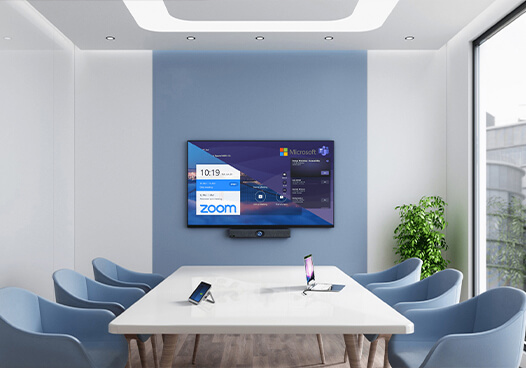
What is a meeting room solution? A meeting room solution pertains to an all-inclusive arrangement that encompasses all the hardware and software, as well as all the meeting room connectivity aspects, and more. This ensures that meetings remain productive. It allows for the automation of the environment in such a way that all of the collaboration, communication, and presentation tools operate without the hassle of configuration and problem-solving. In a nutshell, it ensures that every room booking panel, regardless of its size and purpose, provides the same experience during meetings.
Core Components
Complete meeting room solutions in Dubai normally include:
- Room controller: a touch device used for initiating, controlling, and ending meetings.
- Camera: Captures clear video for remote participants.
- Microphone or mic array: Ensures clear voice pick-up from anywhere in the room.
- Speaker: Provides balanced sound to all present.
- Codec or compute unit: It processes audio, video, and data to present smooth communications.
- Display: one or more screens to show video feeds and shared content.
- Scheduling panel: Shows room availability and allows for quick booking.
- Cabling and mounts: Provide secure, organised connections for all devices.
- Network connectivity enables stable, high-quality data transfer with minimum latency.
Each component plays a role in making the meeting reliable. Together, they eliminate technical friction from meetings and make them more natural.
Typical Integrations
The most effective meeting room solutions are those that are integrated with current business systems. Common integrations include:
- Unified communication platforms: The person’s hosts will join by using the audio (and video) services supplied, such as Microsoft Teams, Zoom and Cisco Webex.
- Calendar Sync: Integration with Microsoft Exchange, Outlook or Google’s calendar to help automate Scheduling and Updating.
- Booking systems: Manage the use of meeting rooms and prevent double booking.
- Platforms for identity and security: Assure authorised access to meetings and enable single sign-on.
- Tools for collaboration and signage: Provide support for occupancy sensors, digital whiteboards, and real-time room usage displays.
These integrations guarantee that meetings are easy to plan, safe to access, and uniform across locations and departments.
Deployment Models
The flexibility for organisations in the deployment of meeting room solutions based on their infrastructure, security requirements and management practices.
- Locally hosted (on-premises): The systems are installed in the company’s own server or data centre. This has the highest level of control and data privacy, but maintenance overhead.
- Cloud-managed: Devices communicate with a cloud service for configuration, monitoring, and updates. This reduces IT burden and makes it easier and faster to scale across any number of locations.
- Hybrid: Combines both models. Confidential information is kept on premises, and the remaining services are cloud-managed for flexibility. It balances security with convenience.
- Managed service/provider-hosted: The system is provided by a third-party vendor as a service. It brings up front costs and expert maintenance to businesses without the need for their own IT staff.
Every model meets disparate needs, ranging from maximum control to total delegation, helping tailor deployment as per their size, compliance and support aptitude.
Key Benefits for Businesses
Structured meeting room solutions offer the following benefits:
- Meetings begin punctually and are executed seamlessly.
- There is a reduction in downtime and the number of calls to the IT support company in UAE.
- Meetings are implemented at all locations and are experienced uniformly.
- Enhanced security and compliance are offered with integrated access controls.
- Collaborative synergy and participation from all team members in a meeting are boosted.
- Predictable pricing is there when you go for managed or cloud services.
Practical Considerations & Checklist
Keeping the following list in mind when considering or deploying a meeting room solution is highly recommended.
- Size and layout of the room: The room capacity has to be efficiently met with the equipment and acoustics.
- User workflows: Make sure that joining and scheduling are easy and consistent.
- Interoperability: Verify that it is compatible with the UC platforms and devices that you decide to utilise.
- Budget and scalability: Consider both the upfront cost and ongoing management.
- Network readiness: Make sure you have sufficient bandwidth and a reliable connection.
- Support model: Choose between handling maintenance internally or relying on outside help.
- The user experience is enhanced more by good sound and lighting than by extra equipment.
Bringing It All Together
A comprehensive solution for meeting rooms offers order and reliability and simplifies business communication. It ensures the technology supports, rather than disrupts, collaboration.
Contact Vernier Technologies for a free room assessment.
FAQs
A meeting room solution is an integrated system of hardware, software, and connectivity that provides a consistent meeting experience. Unlike standalone AV equipment or a single conferencing app, it ties together cameras, microphones, displays, scheduling tools, and collaboration platforms in one managed setup. This will avoid manual device or application switching and ensure that each meeting runs smoothly.
A typical smart meeting room would include at least a video camera, an array of microphones and speakers for sound, a compute unit or codec to process the video, and a room controller to control functions in each room. When taken together, these elements provide uniformity and reliability in every meeting space.
For small or medium rooms that require a fast and uniform setup, the packaged solutions, or turnkey kits, work best. For large or specialised rooms, when there is a need for more intricate configurations or integration with legacy systems, custom builds become more appropriate. Managed services are ideal for organisations that prefer having an expert provider deploy, oversee, and sustain all systems in meeting rooms, with a guarantee of coverage through a set service agreement.
Room booking panels sync directly with calendar systems like Outlook or Google Calendar. They show real-time room availability. This helps prevent different teams from booking the same space. It also allows for quick and easy bookings. Automatic release features free up unused rooms, improving usage and reducing scheduling conflicts.